Adherence is the quiet failure mode of every wearable study: the device only tells you something on the days a participant actually wears it. StudySync already lets research teams see adherence slipping — this project is about doing something smarter with it, by learning each participant’s own wear rhythm and timing reminders to fit it instead of firing the same nudge at everyone at noon.
The feature today
StudySync ships a researcher-facing adherence monitor: per-study and per-participant wear metrics, configurable thresholds, a distribution view of who’s on track versus falling behind, and an automated recovery job that can notify participants when their wear-time drops. It answers who is slipping and when.
What it doesn’t do is actually help the participant increase their adherence. A reminder that arrives mid-run, mid-meeting, or while the watch is still on the charger gets dismissed and trains the participant to ignore the next one. That’s the gap this project closes.
Step 1 — learn how people actually wear the device
Before you can time a reminder, you have to know what “normal” looks like for each participant. We built a wear-pattern pipeline straight off the raw Fitbit signal:
- Parse
hr_intradayheart-rate blobs into wall-clock timestamps. - Bucket into 15-minute slots and fold the calendar into a single week, producing a 7 × 96 missingness matrix per participant (day-of-week × time-of-day; “missing” = no HR sample in that slot = device almost certainly off the wrist).
- Cluster participants who have a real daily shape using hierarchical agglomerative clustering on a DTW distance (Sakoe–Chiba band of ±1 hour, so two people with the same routine offset by an hour still land together), with the number of clusters chosen by silhouette score.
This routine-phenotyping approach is adapted from the Habitome study (Hershkovich et al., 2025), which clusters wearable-derived daily routines into health-relevant phenotypes. Because our cohort is orders of magnitude smaller than theirs (~15,000 participants), we pick the cluster count from the silhouette curve rather than reusing their fixed distance threshold — see the Sources & inspiration section below.
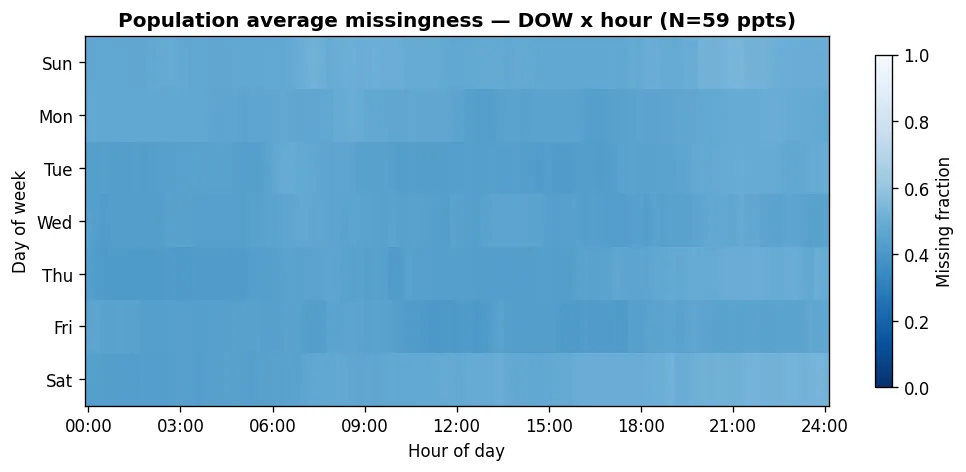
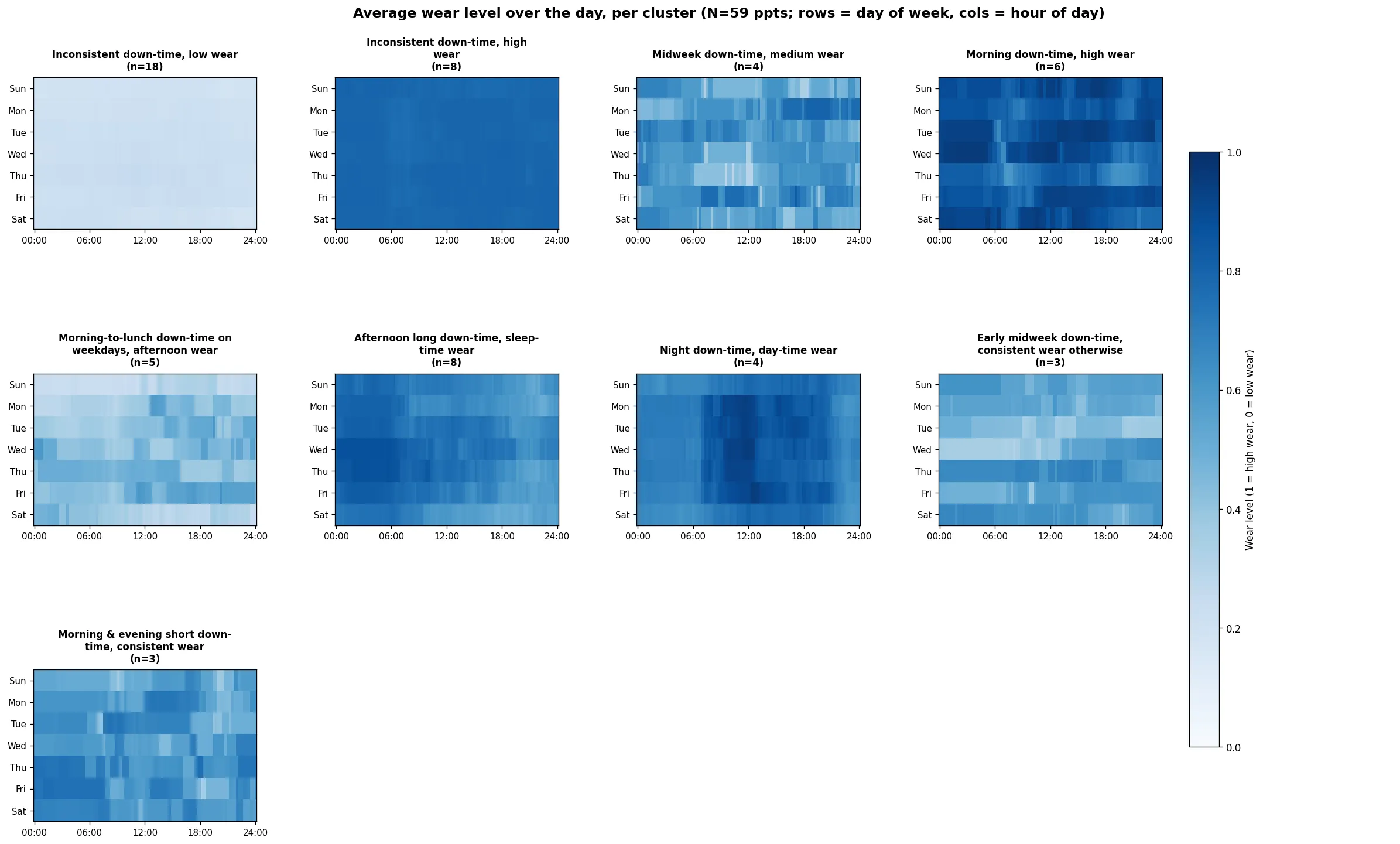
Across the pooled research cohort (154 enrolled, 81 with any Fitbit data, 59 with enough days to model), the patterns are not random. Eight participants wear the device essentially always; eighteen barely wear it at all; the remaining ~33 fall into a handful of distinct daily routines.
Averaged across everyone, the population looks mostly compliant. But that aggregate view hides the individual structure underneath it:
The interesting signal is in the per-cluster averages. Each panel is one cluster’s typical week, and the names are descriptive of the routine the algorithm surfaced: “morning down-time,” “afternoon long down-time, sleep-time wear,” “night down-time, day-time wear,” and so on. These off-wrist windows are exactly the openings a reminder should help minimize:
The two signals: heart rate for wear, CoreMotion for motion
Everything above rests on two independent signals, and it’s worth being precise about what each one measures and why we chose it.
Heart rate tells us whether the watch is on. Fitbit’s optical (PPG) heart-rate sensor
only produces a reading when the band is against skin — take the watch off and the
hr_intraday stream simply stops. That makes the presence of a heart-rate sample the most
direct passive proxy for wear we have: a slot with at least one HR sample means the device
was on the wrist; a slot with none means it was off (or charging). We key on heart rate
rather than steps or sleep on purpose — HR is the only channel recorded continuously
throughout the day whenever the watch is worn, while steps appear only while you’re moving
and sleep stages only at night, so both leave large gaps that have nothing to do with wear.
We bin the stream into 15-minute slots (96 per day): fine enough to resolve a
morning-versus-evening routine, coarse enough to ride over the natural jitter and brief sync
gaps in intraday sampling, and it folds cleanly into the 7 × 96 weekly matrix the clustering
runs on. (Samples come from the fitbit_data.hr_intraday JSONB, which covers the full
81-participant Fitbit cohort rather than the 29 in the dedicated HR table.)
CoreMotion tells us what the person is doing — even when the watch is off. This is the
missing half: heart rate goes silent the moment the watch comes off, which is exactly when we
most need to know whether it’s safe to nudge. CoreMotion is Apple’s on-device motion
framework; the StudySync iOS app records the iPhone’s own activity classification
(stationary, walking, running, automotive, cycling, or unknown, each with a
confidence level) independently of the Fitbit. For each 15-minute slot we take the
dominant activity (the most frequent class in that slot, ties broken toward the more
active state), and treat a slot as moving when that activity is walking, running,
cycling, or automotive. Two things fall out of this. First, it explains why a wear gap
happened: a not-worn stretch that lines up with automotive is likely the watch in a car
cradle, while one that lines up with stationary overnight is just the expected charging
window. Second, and this is what Algorithm 2 relies on, it lets us avoid firing a “charge
your watch” nudge while someone is driving or out for a run, and instead aim for the moments
they’re usually both off-wrist and still.
One honest caveat: CoreMotion only flows when the participant has their phone with them, so its coverage is thinner than the always-on heart-rate stream. Heart rate carries the wear story; CoreMotion sharpens the timing.
Step 2 — the notification timing algorithm (proposed)
Once we have a picture of each person’s typical week, the reminder system is three small, common-sense steps. There’s no black box and no guesswork by a machine here, just the pattern of when the watch is worn plus a little bit of movement data from the phone.
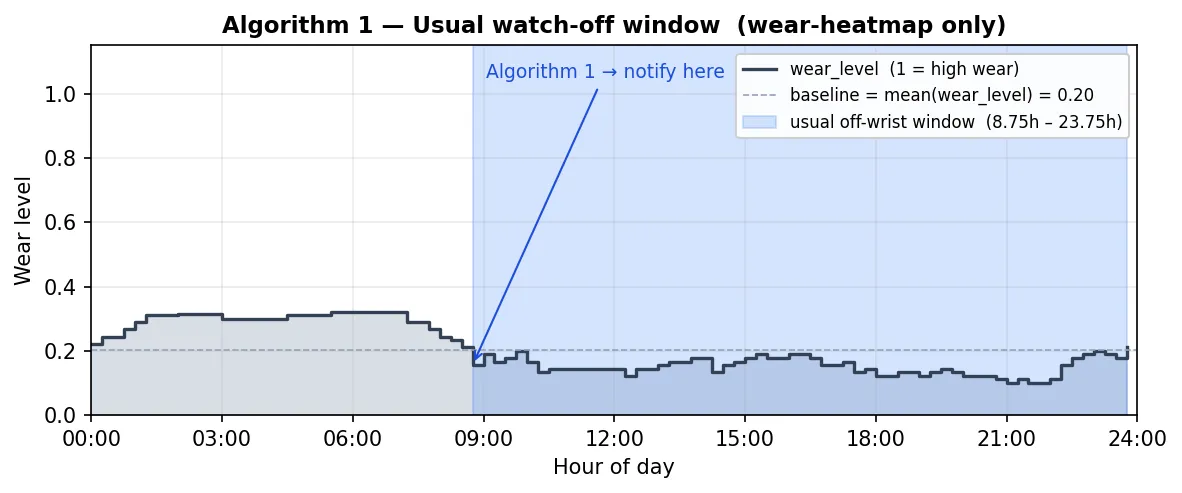
Algorithm 1: find the usual “watch-off” window. The first and simplest version looks only at when the watch is normally worn. Picture the day chopped into 15-minute chunks. For each chunk we look back over the last couple of weeks and ask a simple question: on how many of those days was the watch actually on the wrist at that time? Do that for every chunk and a picture of the person’s normal day appears, the times they almost always wear it and the times they usually don’t. We then work out their average wear across the whole day and find the longest stretch that sits below that average, which is the part of the day they are most reliably without the watch. That stretch is their usual “watch-off” window, and it is the obvious place to suggest a charge. There is one safety check: if even their longest off-wrist stretch is shorter than about an hour, their routine just isn’t regular enough to count on, so the app says “no reliable charging window” and stays quiet rather than guess.
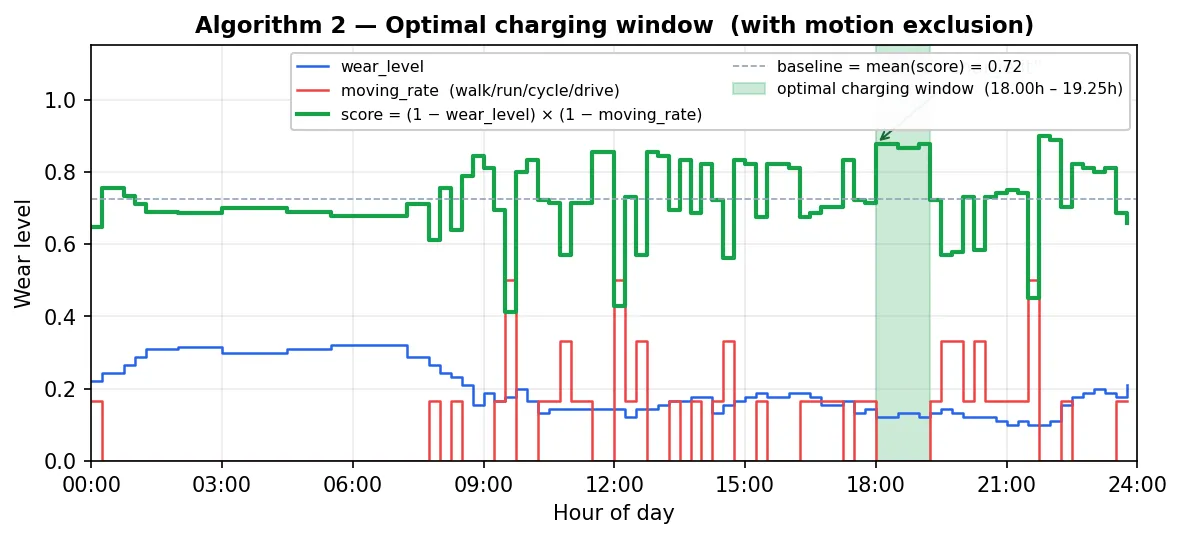
Algorithm 2: pick the best moment to say “charge your watch.” Knowing the watch is usually off isn’t quite enough, because “off the wrist” and “a good time to charge” aren’t the same thing. Someone might take the watch off and head straight out for a run or get in the car, and a “charge your watch” buzz right then is useless. So this version adds a second clue from the phone: roughly how often the person is on the move (walking, running, cycling, or driving) at each time of day. Now we look for the time that works on both counts at once, when the watch is usually off and the person is usually sitting still. A quiet evening on the couch scores well; a morning commute scores poorly even if the watch happens to be off, because they are moving. We pick the longest stretch of the day where both of those line up (again, at least about an hour long) and send the “charge your watch” reminder right at the start of it. If no part of the day clearly fits both conditions, we hold off rather than buzz them at an awkward moment.
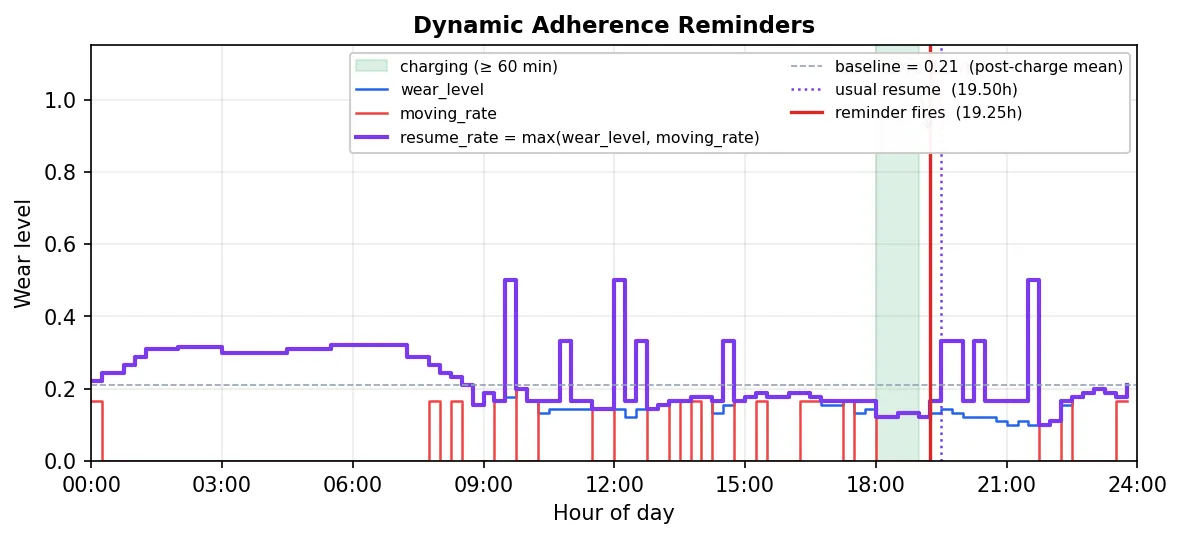
Algorithm 3: remind them to put it back on. A watch sitting on the charger is no more useful than one forgotten in a drawer, so the last step is the nudge to put it back on. We start from the charging time the previous step picked and wait about an hour, long enough for a real top-up, because reminding someone to wear a watch that is still charging would just be annoying. After that, we look for when the person normally gets going again, the first time of day they are usually either wearing the watch once more or up and moving around. We send the “put it back on” reminder a little before that, around fifteen minutes, so the watch is back on their wrist before they would otherwise leave it behind and a gap opens up in the data. And because this reminder is always set for after the charging time, it can never clash with the “charge your watch” nudge from the step before.
Why it matters
Every reminder timed to a participant’s real rhythm is a data gap that doesn’t open, and a nudge that doesn’t get tuned out. Instead of one fixed alert for an entire cohort, StudySync moves toward a reminder schedule that is personal, motion-aware, and explainable to the research team — adherence recovery that works with each participant’s day rather than against it.
What’s next
The wear-pattern pipeline and the timing algorithms are validated against the research cohort offline. Next is wiring the timing layer into the live adherence-recovery job behind the existing notification preferences, and a pilot that measures recovered wear-time against the current fixed-schedule reminders.
Sources & inspiration
The wear-pattern clustering is built on prior work — most directly the Habitome study, which inspired the idea of phenotyping routine from wearable data:
- Habitome (primary inspiration). Hershkovich, L. et al. “Defining the Habitome: Phenotypes of Routine and Their Relationship to Health Outcomes.” Research Square preprint, rs-5861743/v2 (2025). The clustering-into-routine-phenotypes approach this project adapts to a small study cohort.
- Salvador, S. & Chan, P. “Determining the number of clusters/segments in hierarchical clustering/segmentation algorithms.” 16th IEEE Int. Conf. on Tools with AI, 576–584 (2004). Guidance on the DTW warping-band width.
- Rousseeuw, P. J. “Silhouettes: A graphical aid to the interpretation and validation of cluster analysis.” J. Comput. Appl. Math. 20, 53–65 (1987). The silhouette score used to choose the number of clusters.
The charging-window / re-wear notification algorithms are original to this project, built on the wear-heatmap above plus on-device CoreMotion activity.